Cute Doodle Butterfly Papers Overlays
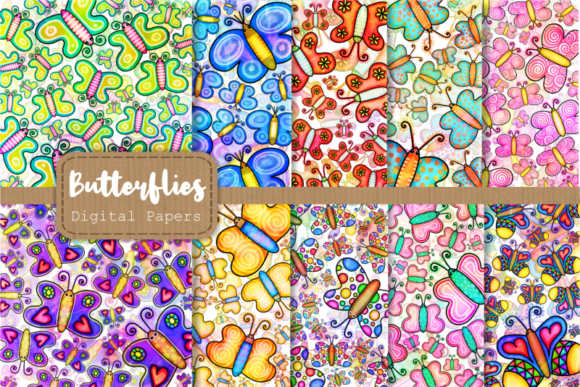
If you have ever wanted to add a whimsical, nature-inspired touch to your creative projects without spending hours drawing or editing from scratch, the Cute Doodle Butterfly Papers Overlays set might be exactly what you need. This collection combines two versatile resources in one package: ten high-resolution JPG digital papers and ten transparent PNG overlays, all featuring charming butterfly and bug motifs. Whether you are designing a greeting card, building a social media graphic, or creating classroom materials, these assets give you a ready-made artistic foundation that is both beautiful and flexible.
The set is built around the theme of artistic insects, wings, wildlife, and nature, but the doodle style keeps everything approachable rather than overly realistic. The butterflies feel playful and hand-drawn, which makes them suitable for everything from elegant invitations to casual scrapbook pages. Each file is 12 x 12 inches at 300 dpi, meaning you get crisp, print-ready resolution whether you are working on a digital screen or sending a project to a printer.
What Makes These Butterfly Overlays and Digital Papers Stand Out
Many design resources force you to choose between a patterned background or a standalone graphic element, but this set gives you both. The Cute Doodle Butterfly Papers Overlays collection includes JPG files that are fully finished digital papers, complete with backgrounds and butterfly artwork already arranged. These are perfect when you want a complete, cohesive look with minimal effort. Just open a file, place it behind your text or other design elements, and you are halfway done.
The transparent PNG overlays, on the other hand, are where the real creative freedom comes in. Each overlay features a butterfly or bug design with a transparent background, allowing you to layer them onto any color, texture, or photograph. This means you can take a plain background, add one of the overlays, and instantly create a custom look that matches your brand or personal style. The transparent files are also 300 dpi and 12 x 12 inches, so they maintain the same high quality as the papers.
Because the overlays are separate from the papers, you can mix and match freely. Maybe you want to use a paper as a base and then add an overlay on top for extra depth, or perhaps you prefer to use the overlays on their own against a solid color. This modular approach saves you from having to edit out backgrounds or manually cut out images, which is a huge time-saver for anyone who is not deeply experienced with photo editing software.
Practical Ways to Use Cute Doodle Butterfly Papers Overlays
The versatility of this set means it can fit into many different workflows and creative goals. Here are some realistic scenarios where these digital papers and overlays shine:
- Greeting cards and invitations – Birthday cards, baby shower invites, or thank-you notes all benefit from the soft, artistic butterfly imagery. Use a JPG paper as the card background and add a transparent overlay for a layered effect.
- Social media graphics – Whether you run a small business, a personal blog, or a nature-themed Instagram account, the overlays can be placed over photos or solid backgrounds to create branded posts that feel cohesive and polished.
- Print-on-demand products – If you create items for platforms like Redbubble, Etsy, or Printful, these designs can be used on notebooks, phone cases, wall art, and tote bags. The high resolution ensures your products look professional at any scale.
- Classroom and educational materials – Teachers and educators can use the papers for worksheets, bulletin board decorations, or nature study handouts. The friendly doodle style appeals to children while still looking tasteful enough for adults.
- Digital scrapbooking and journaling – Hobbyists who enjoy digital planning, scrapbooking, or memory keeping will appreciate having both backgrounds and cut-out elements ready to drop into layouts.
- Packaging and labels – Small business owners who make handmade soaps, candles, or gifts can print these papers for tags, labels, or wrapping paper that reflects a natural, artistic brand identity.
Each of these use cases benefits from having both the paper and overlay options. You are not locked into one look, and you can adjust the opacity, scale, or placement of the overlays to suit whatever project you are working on.
How Beginners Can Get Started with Butterfly Overlays
If you are new to using digital papers and overlays, the process is simpler than it might seem. You do not need advanced design skills or expensive software. Most basic photo editing programs, including free ones, can handle these files without any trouble. Here is a straightforward way to begin:
- Open a JPG digital paper as your base layer. This gives you an instant, beautiful background with butterfly artwork already in place.
- Open a transparent PNG overlay in a separate layer. Because the background is already transparent, you can simply drag or place it on top of your base.
- Resize or rotate the overlay as needed. The 12 x 12 inch size gives you plenty of canvas, but you can scale down easily without losing quality.
- Experiment with blending modes if your software supports them. Settings like multiply, overlay, or soft light can change how the butterfly interacts with the background, adding depth and texture.
- Add your text or other elements around or on top of the butterfly design. Because the overlays are separate, you can place text exactly where you want without competing with a busy pattern.
For those who want to go further, you can also use the overlays on photographs. Drop a transparent PNG over a scenic nature photo or a solid pastel background, and the butterfly will appear to float naturally in the scene. This technique works beautifully for website headers, blog post images, or digital invitations.
Key Considerations When Using Digital Papers and Overlays
While the Cute Doodle Butterfly Papers Overlays set is designed to be user-friendly, there are a few practical points worth keeping in mind to get the best results from your projects.
File format and software compatibility – The JPG files are standard and will open in virtually any program. The transparent PNG overlays are also widely supported, but some very basic image viewers may not display transparency correctly. If you plan to use the overlays, make sure your editing software supports layers and transparency. Free options like Photopea, Canva, or GIMP work perfectly, as do professional tools like Photoshop or Affinity.
Print versus digital use – Both file types are 300 dpi at 12 x 12 inches, which means they are optimized for printing. If you are creating something for screen only, like a social media post, you can safely reduce the resolution without visible loss. For print projects, keep the files at their original size and resolution to maintain sharpness.
Color matching – When you place a transparent overlay over a colored background, the butterfly design will pick up some of the background’s tone through any semi-transparent areas. This is usually a desirable effect that makes the overlay feel integrated rather than pasted on. If you want a more solid look, you can duplicate the overlay layer or adjust the opacity settings.
Licensing and usage – Always check the specific terms that come with your purchase, but generally, these types of digital papers and overlays are intended for both personal and commercial use in finished products. This means you can use them in items you sell, but you typically cannot resell the raw files themselves. Understanding your usage rights helps you avoid issues down the road, especially if you are creating products for a business.
Storage and organization – With twenty high-resolution files in the set, taking up some space on your drive, it is good practice to keep them organized in clearly named folders. Separate the JPG papers from the PNG overlays so you can quickly find what you need during a project.
By keeping these points in mind, you can avoid common beginner pitfalls and move straight to creating designs that look intentional and polished.
The combination of artistic butterfly and bug imagery, high resolution, and the dual paper-and-overlay format makes this set a practical addition to anyone’s design toolkit. Whether your goal is to save time, add a nature-inspired aesthetic, or experiment with layered compositions, the Cute Doodle Butterfly Papers Overlays give you room to explore without requiring advanced technical skills. For creators at any level, having both finished backgrounds and flexible cut-out elements in one place is a small convenience that makes a real difference in the flow of a project.