Fall Elements, Cards and Patterns: A Practical Evaluation for Design Projects
When you are researching design resources for seasonal projects, the bundle titled Fall Elements, Cards and Patterns may appear as a candidate. This digital collection provides a set of hand-sketched assets centered on autumn themes. Understanding what this bundle contains, how it fits into different workflows, and where its limitations lie can help you decide if it matches your creative needs. This article offers a balanced, objective look at the offering, focusing on practical considerations rather than promotional claims.
What Fall Elements, Cards and Patterns Offers
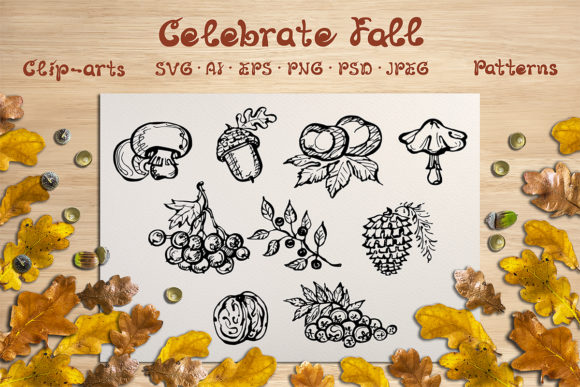
This bundle is a curated set of graphic design assets created around a hand-drawn fall aesthetic. It includes 9 individual cards featuring fall elements, 8 seamless patterns with autumn motifs, and 8 additional premade cards that already incorporate both fall elements and accompanying text. The collection also provides a hand-drawn alphabet. In total, you receive 26 files in each of six formats: JPEG, EPS10, SVG, PNG, PSD, and AI. All files are set at a resolution of 8334 by 8334 pixels and use the RGB color space. It is important to note that the text on the premade cards is not editable, and the bundle does not include samples or mockups.
The variety of formats means the assets are accessible across many design environments. Whether you work primarily in Adobe Photoshop, Illustrator, Affinity products, or even web-based tools that accept SVG or PNG files, you have multiple options. The high resolution makes the files suitable for both digital and print applications, though you should always verify that the specific dimensions match your intended output.
Why Someone Might Be Interested in This Bundle
There are several reasons a designer or creative professional might consider Fall Elements, Cards and Patterns. The most obvious is a need for autumn-themed visuals. Fall is a popular season for branding, event materials, social media campaigns, product packaging, and personal projects. Having a cohesive set of hand-sketched elements can save time compared to creating each asset from scratch.
The hand-drawn style itself is a distinguishing feature. Many design projects benefit from an organic, human-made feel rather than a purely vector-generated or photo-based look. The combination of individual cards, patterns, and an alphabet allows a degree of flexibility. You might use a pattern as a background, a card as a social media graphic, or the alphabet for headlines and titles. The premade cards can serve as quick solutions for those who need a finished design with minimal modification.
Another factor is the range of file formats. When you are evaluating a design resource, compatibility with your existing tools is critical. Having EPS10, AI, PSD, SVG, PNG, and JPEG versions means you can work in raster or vector workflows without conversion issues. The inclusion of SVG files is particularly useful for web and UI projects where scalability matters.
Benefits and Tradeoffs
Like any design resource, this bundle has clear advantages and certain limitations that need thoughtful consideration.
Benefits
- High resolution: 8334x8334 pixels provides ample quality for most print sizes and high-resolution digital displays.
- Multiple formats: You are not locked into one software ecosystem. The EPS10, AI, and SVG files preserve vector properties, while PNG and JPEG offer raster options with transparency support in PNG.
- Hand-drawn aesthetic: The style is distinctive and may add a personal, crafted touch that differs from standard clip art or stock vectors.
- Cohesive theme: Because all elements share a consistent fall concept and sketching method, you can combine them seamlessly in a single project.
- PSD files: These allow you to work with layers if you use Photoshop, offering some flexibility in editing individual components.
Tradeoffs and Limitations
- Text is not editable on premade cards: The text has been rasterized or flattened. If you need to change the wording, font, or color of the text, you cannot do so directly. You would need to recreate the text overlay yourself, which reduces the time-saving benefit of using premade cards.
- No samples or mockups included: You will not receive presentation-ready mockup files that show how the designs look in context. You would need to create your own mockups if required.
- Single theme: The focus on fall elements means this bundle is less versatile for projects that need year-round or other seasonal themes. Its utility is strongest within a narrow window of use cases.
- Specific style: The hand-sketched look may not suit every brand or project. If your design language calls for clean vector illustrations, realistic photography, or minimalist flat design, this bundle may feel mismatched.
- File size and dimensions: 8334x8334 pixels is very large. While this is beneficial for print, it can be cumbersome for web use if you are not accustomed to resizing assets. The JPEG files in particular may be heavy to download or store.
Considerations Before You Choose
Before deciding to use Fall Elements, Cards and Patterns, evaluate how the bundle aligns with your specific project requirements. One key factor is file format compatibility. Ensure that your design software can open EPS10 or AI files if you plan to edit vectors. For users of Affinity or CorelDRAW, EPS files generally work, but SVG may be the safest cross-platform choice. If you rely heavily on Canva or similar web-based tools, PNG or SVG will likely be more practical than PSD or AI.
Another consideration is resolution. While 8334x8334 pixels is generous, it is square. If your project requires a different aspect ratio, you will need to crop or resize the assets. This may affect composition, especially for premade cards where the text and elements are already arranged. Check the layout of the premade cards to see if their square format works for your intended use, such as Instagram posts, flyers, or square invitations. For rectangular formats like standard letter paper or widescreen displays, you will need to adapt the designs.
The non-editable text on the premade cards warrants careful thought. If you envision using these cards as-is with the existing text, then this limitation may not matter. However, if you need customization for client work, different languages, or specific messaging, you will have to manually replace the text. This could involve erasing the original text and creating new text layers, which requires extra time and skill. In some cases, the hand-drawn style of the original text may be difficult to replicate exactly with standard fonts, so your replacement might not match perfectly.
When This Bundle Is a Strong Fit
There are scenarios where Fall Elements, Cards and Patterns becomes a valuable asset in your toolkit. If you are working on a fall-themed campaign that requires a hand-crafted look, such as a harvest festival, Thanksgiving event, or autumn product launch, the cohesive style saves you from mixing disparate resources. The patterns can be used for wrapping paper, tablecloths, website backgrounds, or fabric designs. The individual cards work well for greetings, social media posts, or small print items.
The hand-drawn alphabet is particularly useful if you want to create custom headlines or signage that matches the aesthetic of the cards and patterns. Using the alphabet alongside the other elements ensures visual consistency across your project. For designers who value a unified, artisanal feel, this bundle provides a ready-made visual language.
If you work in print design, the high resolution and multiple vector formats allow you to scale elements without quality loss. You could use the patterns as seamless repeats for product packaging or stationery. The RGB color space is standard for digital screens, but you should convert to CMYK if you are producing professional print work. Keep in mind that the bundle does not include calibrated color profiles, so you will need to manage color conversion yourself.
When Alternatives May Be Worth Considering
Despite its strengths, this bundle is not the best option for every situation. If you require editable text in premade designs, you are better served by a resource that offers fully layered and editable text files. Many design bundles on the market provide text in editable formats such as PSD with smart objects, AI with live text, or even Canva templates. If customization of wording is central to your workflow, look for resources that explicitly state text is editable.
For projects that require a different visual style, such as modern flat design, watercolor, retro vector, or photographic realism, this hand-sketched autumn aesthetic may stand out in a way that does not match your direction. In those cases, seeking theme-appropriate alternatives will save you retouching work. Similarly, if your project spans multiple seasons or is evergreen, investing in a resource limited to fall may not justify the cost.
If you do not need the high resolution or the variety of file formats, a smaller, lower-cost bundle with PNG-only fall elements could suffice. The 8334x8334 resolution is overkill for typical web use, so you may pay for quality you do not use. Additionally, if you do not work with vector software, the EPS10, AI, and SVG files may be irrelevant. A focused collection of hand-drawn PNGs at print resolution might be more economical.
Another alternative is to commission custom hand-drawn fall elements. If you have specific requirements, such as a unique color palette, custom characters, or a particular style variation, a bespoke set from an illustrator will give you more control. This is generally more expensive and time-consuming, but it may be necessary for high-stakes branding projects where uniqueness is paramount.
Practical Decision-Making Insights
To evaluate whether Fall Elements, Cards and Patterns aligns with your goals, start by listing the assets you actually need for your project. If you need both cards and patterns, plus an alphabet, this bundle offers all three in a consistent style. If you only need one type of asset, consider whether the bundle still provides overall value or if a smaller purchase from another source would be more efficient.
Examine the resolution requirements of your final output. For large-format prints such as posters or banners, 8334x8334 pixels is excellent. For standard flyers or digital ads, this is more than sufficient, but you will need to resize. Confirm that the square aspect ratio works for your layout. If it does not, assess whether the time spent adapting the assets is acceptable.
Test the compatibility of the file formats using a trial version of your software if necessary. Download sample files if available to ensure that EPS10, AI, or SVG opens correctly in your environment. For teams, ensure that all members can access at least one common format. The PNG files are a safe fallback, but they lack vector scalability.
Consider the non-editable text constraint. If the premade cards contain messages that are close to what you need, you might use them with minor overlay adjustments in your design software. However, if you anticipate frequent text changes, this becomes a recurring obstacle. In that case, the bundle is best used for its individual elements and patterns, with the premade cards serving as inspiration rather than final deliverables.
Finally, think about the broader context of your design library. A hand-sketched fall collection can be a valuable seasonal component, but it requires other resources to complement it for year-round use. If you already own complementary assets in similar styles, this bundle integrates easily. If not, evaluate the additional effort needed to bridge styles across different projects.
Conclusion
Fall Elements, Cards and Patterns is a focused design resource that delivers hand-sketched autumn visuals in multiple formats and high resolution. Its strengths lie in cohesive style, format variety, and scalability. Its limitations center on non-editable text, narrow thematic scope, and lack of mockups. For designers working on fall projects that benefit from an organic, hand-drawn aesthetic, this bundle can be a practical time-saver. For those needing editable text, broader theme applicability, or a different visual direction, exploring alternatives may yield a better match. By weighing your specific needs against what this bundle offers, you can make an informed decision that supports your creative process.