Funny Animal Cartoon Seamless Pattern: What to Check Before You Buy or Use That ZIP File
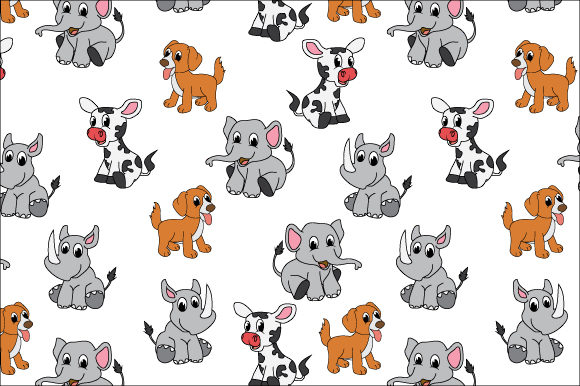
You have a great idea for a project—maybe it’s wrapping paper for a children’s birthday, a playful background for a website, or fabric for custom tote bags. A funny animal cartoon seamless pattern sounds perfect. The animals are whimsical, the repetition is soothing, and the ZIP file promises SVG, AI, and EPS 10 formats. It seems like a one-click solution. But if you’ve ever downloaded similar assets and ended up frustrated by scaling issues, blank areas in your design, or compatibility troubles, you know that not all seamless patterns deliver what they advertise. Let’s walk through what you really need to examine before opening that wallet or clicking “download.”
Understanding What a Seamless Pattern Actually Requires
A genuine seamless pattern repeats without any visible edges, seams, or interruptions. When you tile it across a surface, the animal motifs line up perfectly, and the background flows continuously. Many buyers assume that if a file is labeled “seamless,” it has been properly engineered for tiling. That is not always true. Some patterns are simply cropped rectangles with cute animals placed inside. When you repeat them, you see hard lines where the left edge meets the right, or where the top meets the bottom. This mistake happens because the seller did not align the elements properly at the borders.
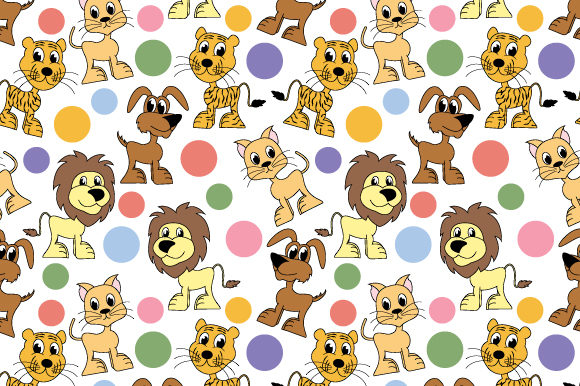
Before you buy a funny animal cartoon seamless pattern, open the preview image in your browser and test it mentally. Look at the edges. Do any animals appear cut off? Do background colors change abruptly at the borders? If the preview looks clean, the pattern likely passes the basic tiling test. But even a clean preview can hide problems with scaling or file format quirks.
Checking the ZIP File Contents Beyond the Labels
The ZIP file you receive should contain SVG 1.1, Ai 10, and EPS 10 formats. Each serves a different purpose. SVG is great for web and vector editing in tools like Inkscape and Illustrator. Ai 10 is compatible with older versions of Adobe Illustrator. EPS 10 works across many vector and layout programs. What people often overlook is whether the files inside the ZIP are actually usable in their specific software version.
For instance, EPS 10 is a relatively old standard. It typically works well, but some modern vector editors have limited support for older EPS files. If you are using Affinity Designer, CorelDRAW, or a free tool like Gravit Designer, you might find that the EPS file opens with missing elements, incorrect colors, or no fill. The SVG file is usually your safest bet for cross-compatibility, but even SVG can fail if it uses complex filters or embedded raster images that your software cannot render.
To avoid wasted time, check the product description carefully. Look for statements about software compatibility beyond just the file formats. If the seller says “works in Adobe Illustrator and Inkscape,” that is reassuring. If they only list the format names without testing notes, proceed carefully. Download a sample if the store offers one, and open it in your actual workflow before committing to a paid purchase.
Scaling Issues That Ruin Your Project
One of the most frustrating mistakes is assuming that a seamless pattern can be scaled infinitely without breaking. Vector formats like SVG, AI, and EPS are mathematically defined, so they can be enlarged or reduced without pixelation. That is true for the shapes themselves. But a seamless pattern is not just a single shape—it is a tiling system. If you scale the pattern tile up or down, the repeat size changes. That affects how many animal faces appear per square foot of your final product.
Imagine you are designing a phone case. You want the animals to be small and frequent, like a subtle texture. But if the original tile is large and you scale it down to fit your canvas, the animals become tiny and cramped, and the pattern loses its charm. Conversely, if you are wrapping a large wall mural, you may want the animals to be big and bold. But scaling the tile up too far can make the repeated elements feel sparse or disconnected.
The solution is to test the pattern at your desired output size before you finalize your design. Open the SVG or AI file, create a copy, and scale it to your target dimensions. Then tile it manually or use your software’s pattern fill tool to see how it looks. If the result feels off, you may need to adjust the scale or look for a pattern with a different original tile size. Sellers who provide the tile dimensions in inches, centimeters, or pixels are being helpful. If that information is missing, ask or estimate from the preview.
Ignoring Color Management and Layering
Another overlooked detail is how the pattern handles color. Many funny animal cartoon seamless patterns come with bright, saturated palettes. That is often what draws you in. But colors that look vibrant on your screen may print differently on fabric, paper, or plastic. The files inside the ZIP may use RGB color mode, which is fine for screens but not ideal for professional printing. CMYK is the standard for most printers. If your pattern is RGB and you send it to a commercial printer without conversion, you risk dull or shifted colors.
Also check whether the pattern uses global swatches or spot colors. Spot colors can increase printing costs and complicate the process. If you are a small business owner making your own products at home, this may not matter. But if you are hiring a print shop, ask them what file format and color mode they prefer. Provide the SVG or EPS file in CMYK if possible, and confirm that the printer can handle it.
Layering is another hidden issue. Some pattern files come with dozens of layers: separate layers for each animal, background, shadows, and decorative elements. That is great for editing. You can change a single animal’s color or remove one element. But if the file is overly complex, it may slow down your software or cause export errors. When you open the file, check the layer panel. If you see 50 layers and you only need a simple fill, consider simplifying the artwork by merging flattened copies. Keep a backup of the original layered file for future edits.
Expecting Instant Perfection Without Adjustment
Many creators download a seamless pattern and apply it directly to their project, only to find that the alignment is slightly off, the colors clash with their text, or the repeat creates an awkward focal point. They blame the pattern, but the real issue is that seamless patterns usually require a small amount of tweaking. Even professional-grade patterns may need rotation, scaling, or repositioning to fit your specific layout.
For example, you might be creating a blog header with a funny animal cartoon seamless pattern behind the title. The pattern looks great, but one of the animal faces lands right behind your logo, creating visual clutter. Instead of giving up on the pattern, move the tile within your design software so that the busy part falls outside the focal area. You can also adjust the pattern’s opacity, blur the background slightly, or add a solid color overlay to reduce contrast. These small adjustments often turn a mediocre fit into a perfect one.
If you are a marketer or entrepreneur producing branded merchandise, resist the urge to use the pattern as-is without testing it on multiple mockups. A pattern that looks charming on a phone case might feel overwhelming on a large duffel bag. Print a small test piece or use a digital mockup generator to preview the pattern at scale. This step costs little time but saves you from producing a batch of items that feel off.
Legal and Licensing Pitfalls
Funny animal cartoon seamless patterns are often sold for both personal and commercial use, but the license terms vary widely. Some allow unlimited commercial use, including resale of products made with the pattern. Others restrict use to personal projects only, or limit the number of items you can produce. If you are a small business owner or freelancer making products to sell, you must read the license agreement included in the ZIP file or linked on the product page.
A common mistake is assuming that buying a digital file gives you full ownership. It does not. The creator retains the copyright. You are only buying a license to use it under certain conditions. If you violate those conditions, you could face a cease-and-desist letter or a request for additional payment. Look for a plain-language summary of the license inside the ZIP. If you cannot find one, contact the seller directly. Reputable sellers are happy to clarify. Avoid any pattern listing that does not mention license terms at all.
Also, understand that “commercial use” sometimes excludes certain categories. For example, you may be allowed to use the pattern on printed shirts but not on digital products like website templates or app backgrounds. Or you may need to purchase an extended license if you plan to use the pattern in a logo or brand identity. When in doubt, choose a pattern from a seller who explicitly grants broad commercial rights and includes a transferable license file.
Practical Steps Before You Buy
Let’s pull this advice into a short checklist you can use the next time you evaluate a funny animal cartoon seamless pattern ZIP file.
- Open the preview image and look for visible seams, cut-off animals, or color mismatches at the edges.
- Confirm that the SVG, AI, and EPS files are present and labeled clearly. Avoid ZIPs that contain only one format.
- Read the product description for software compatibility notes and tile dimensions.
- If possible, download a free sample or test file and open it in your primary design tool.
- Check the file’s color mode (RGB or CMYK) and layer structure before starting your design.
- Review the license terms for commercial use, production limits, and attribution requirements.
- Test the pattern at your intended output size using a mockup or a small print.
- Make small adjustments to placement, scale, or opacity rather than abandoning the pattern if it does not fit perfectly at first.
Taking these steps does not guarantee that every pattern will be perfect, but it dramatically reduces the chances of buying something unusable. You will save time, money, and frustration. More importantly, you will build confidence in your ability to select and apply seamless patterns to your projects, whether you are designing for yourself, a client, or your small business.
Funny animal cartoon seamless patterns are genuinely versatile and enjoyable design assets. They can bring warmth and personality to everything from party decorations to product packaging. By understanding what to check before you buy—and what to adjust after you download—you turn a simple digital file into a reliable tool. That is the difference between a pattern that sits unused in your folder and one that becomes the highlight of your next creative project.